Macros
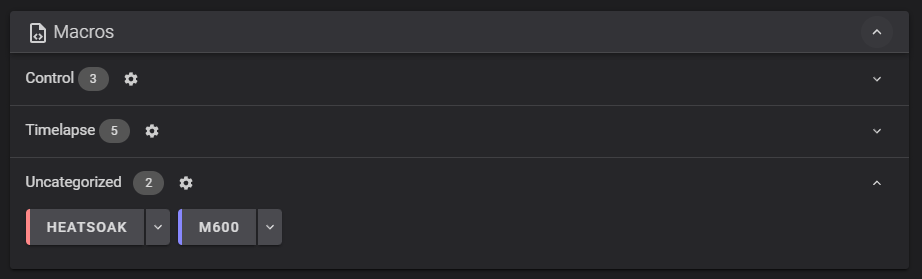
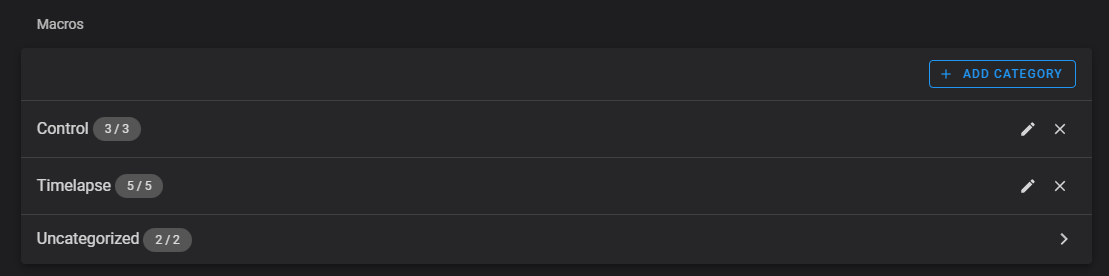
Fluidd displays all G-code macros defined in your Klipper configuration. You can toggle their visibility, organize them into categories, and assign colors.
Macros prefixed with an underscore (_) are hidden from the macro panel automatically.
To categorize a macro, first create a category in the settings menu, then click a macro's menu to assign it to a category and choose a color.
Tool Card Macros
Fluidd detects specific macro names and adds dedicated buttons to the Toolhead card's Tools dropdown. If multiple names are defined for the same action, the first match in the list is used:
| Action | Detected Macro Names |
|---|---|
| Load Filament | LOAD_FILAMENT, FILAMENT_LOAD, M701 |
| Unload Filament | UNLOAD_FILAMENT, FILAMENT_UNLOAD, M702 |
| Clean Nozzle | CLEAN_NOZZLE, NOZZLE_CLEAN, WIPE_NOZZLE, NOZZLE_WIPE, G12 |
| Park Toolhead | PARK_TOOLHEAD, TOOLHEAD_PARK, G27 |
Macro Prompts
A macro can open a dialog in Fluidd to show a message and offer buttons that run G-code. Prompts are built with Klipper's RESPOND command, which requires the [respond] section in your Klipper configuration. Each line sends one action:
| Action | Description |
|---|---|
action:prompt_begin <title> | Starts a new prompt and sets the dialog title. |
action:prompt_text <text> | Adds a line of text. |
action:prompt_button <button> | Adds a full-width button. |
action:prompt_button_group_start | Starts a group — its buttons share a single row. |
action:prompt_button_group_end | Ends the current group. |
action:prompt_footer_button <button> | Adds a button to the dialog footer. |
action:prompt_show | Shows the prompt. |
action:prompt_end | Closes the prompt. |
A <button> is written as <label>|<gcode>|<color>. Both <gcode> and <color> are optional — without <gcode>, the label itself is sent as the command. Supported colors are primary, secondary, info, warning, and error, or any CSS color — a name such as orange, or a hex value with or without the leading # (e.g., f80 or ff8800).
Buttons in a group are given equal widths and wrap onto further rows when they do not fit. Closing the dialog sends action:prompt_end.
[gcode_macro SHOW_PROMPT_BUTTON_GROUPS]
gcode:
  RESPOND TYPE=command MSG="action:prompt_begin Filament change"
  RESPOND TYPE=command MSG="action:prompt_text Choose what to do next"
  RESPOND TYPE=command MSG="action:prompt_button_group_start"
  RESPOND TYPE=command MSG="action:prompt_button Load|LOAD_FILAMENT|primary"
  RESPOND TYPE=command MSG="action:prompt_button Unload|UNLOAD_FILAMENT|secondary"
  RESPOND TYPE=command MSG="action:prompt_button_group_end"
  RESPOND TYPE=command MSG="action:prompt_button_group_start"
  RESPOND TYPE=command MSG="action:prompt_button Preheat|M104 S200|info"
  RESPOND TYPE=command MSG="action:prompt_button Cooldown|TURN_OFF_HEATERS|warning"
  RESPOND TYPE=command MSG="action:prompt_button Cancel|CANCEL_PRINT|error"
  RESPOND TYPE=command MSG="action:prompt_button_group_end"
  RESPOND TYPE=command MSG="action:prompt_footer_button Close|RESPOND TYPE=command MSG=action:prompt_end"
  RESPOND TYPE=command MSG="action:prompt_show"
Further reading
- Klipper
[gcode_macro]configuration reference — all parameters includingvariable_*,rename_existing, anddescription. - Klipper command templates — Jinja2 templates, the
printerobject, delayed G-code, and macro sequencing.
Troubleshooting
Macro not appearing on the dashboard
- Macros prefixed with
_are hidden automatically. Remove the underscore if you want the macro visible. - Verify the macro loaded without errors — check the Fluidd console for any startup messages after a Klipper restart. A config syntax problem will prevent macros from loading.
- If the macro appears in Klipper but not Fluidd, try refreshing the page after restarting Klipper.
Tool Card button not appearing
Fluidd matches macro names case-insensitively, but the name must be an exact match otherwise. Confirm your macro name matches one of the names listed in the Tool Card Macros table above.