Updates
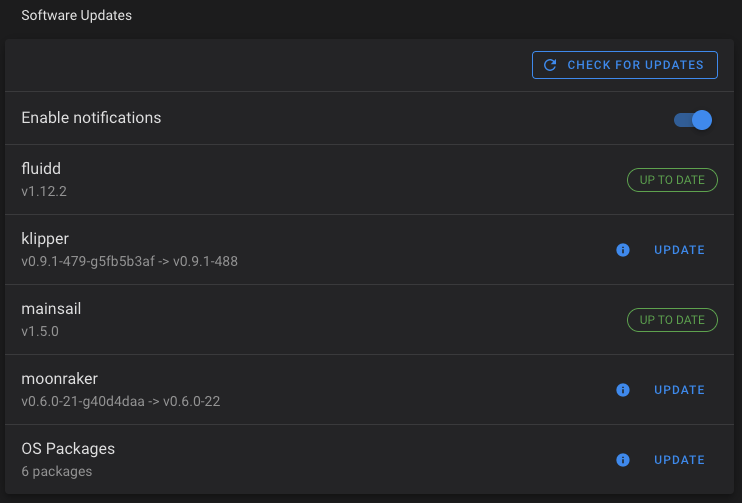
Fluidd allows you to update all of its components, including the host system in an automated way. It will notify you of available updates — and provide buttons to upgrade each individual component.
Automated Updates
Recommended update order
- Klipper — firmware changes may affect Moonraker or Fluidd behavior
- Moonraker — API changes should be applied before updating frontends
- Fluidd
- Other clients
Klipper can be skipped if you have a reason to not update it immediately.
Print in progress
Update requests are blocked while a print is in progress.
In order for this feature to be enabled, you need to configure Moonraker's update plugin. See the Moonraker configuration docs. For advanced options (custom repositories, pinned branches, etc.), see the Moonraker update_manager documentation.
Recovery
If an update fails and a component shows an INVALID status, Fluidd provides a recovery button — click it to attempt automatic repair. If recovery does not resolve the issue, you can update the component manually via SSH (see Manual Updates below) or reach out on Discord.
Updating via KIAUH
If you installed Klipper, Moonraker, or Fluidd using KIAUH, you can also update them through the KIAUH menu. Launch KIAUH and select the update option to update any installed component.
Manual Updates
On an already configured system, you can manually update as follows;
Fluidd
# Update files
cd ~/fluidd
rm -R ./*
rm .version
wget -q -O fluidd.zip https://github.com/fluidd-core/fluidd/releases/latest/download/fluidd.zip
unzip fluidd.zip
rm fluidd.zip

# Restart services
sudo systemctl restart nginx
Moonraker
For manual Moonraker updates, refer to the Moonraker installation docs as the update procedure has changed across versions. The basic steps are:
Klipper
Note, this guide does not cover MCU updates should one be required after a klipper update.
Host Restart
If you wish to restart your host;